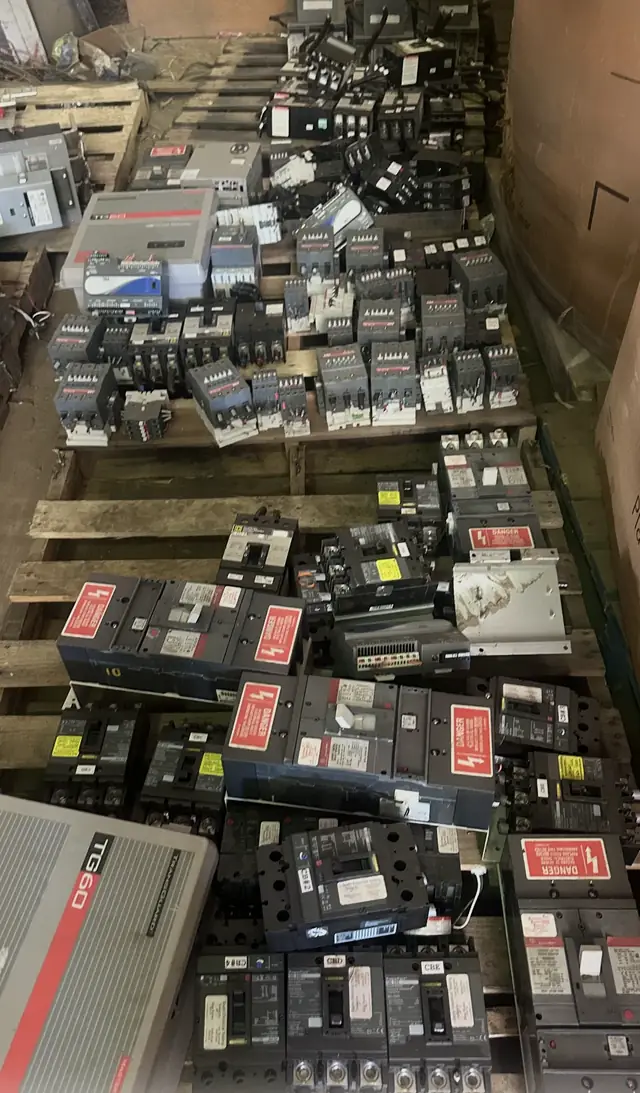
Stop and flag any items that show burn marks, melted insulation, oil contamination, or missing safety labels. Follow current manufacturer instructions and use appropriately qualified electrical professionals and the authority having jurisdiction for removal, testing, and installation. A website submission is not an appraisal, offer, acceptance, safety inspection, compatibility determination, purchase order, pickup commitment, or shipping authorization.
Who should use this page
This page is for electrical contractors, project managers, and warehouse staff with overstock, canceled‑order returns, or leftover project material they want considered for resale. We review qualifying contractor‑marked electrical equipment and inventory for potential purchase; not every submission will meet our buying criteria. Read the guidance and prepare the requested data and photos to help us review and improve the chance of a timely response.
Use this guide to present lots the way a commercial buyer expects: clear quantities, accurate identification, honest condition notes, and logical grouping by project or product type. The advice here is tailored to contractor workflows and typical project surpluses, rather than general facility retrofits or single‑item consumer offers.
- This page focuses on contractor overstock and project surplus only.
- Prepare complete intake data before contacting us to avoid delays.
- Submission does not guarantee purchase; we evaluate items case by case.
Suggested contractor workflow for submissions
Use the following steps to create a clear submission that represents a project lot or overstock batch. Begin by designating a single contact and a single lot name per submission. Consolidate items that belong together (for example, all lighting fixtures from Project A) so we can consider commercial fit and volume without repeated back‑and‑forth.
After consolidation, complete the intake data fields (see Project‑lot intake data), create a packing list, and collect representative photos. Submit your request through the intake channel with the lot name, contact information, and a downloadable packing list. We review qualifying submissions for potential purchase. A submission is a request for review only and is not an appraisal, purchase order, or inspection.
- Step 1: Assign one contact and a single lot name per submission.
- Step 2: Consolidate like items into logical lots (by project, equipment type, or SKU).
- Step 3: Complete intake data, attach a packing list, and include photos.
- Step 4: Submit for review and watch for follow‑up questions or next‑step discussion.
Exact identification and condition fields to include
Accurate identification is the most important factor in the initial review. For each product type in the lot, provide manufacturer‑marked model numbers exactly as stamped on the product, item quantity, and any relevant label data such as catalog or part numbers. If product labels are missing or painted over, note that clearly and provide the nearest visible markings rather than guesses.
Honest condition descriptions speed evaluation and prevent surprises later. Use straightforward terms such as New (unopened), Open Box, Installed/Unused, Good, Fair, and Salvage. Do not provide installation or electrical instructions in the submission. If items show heat damage, oil contamination, rust that affects fit, or corrosion, stop and note these as safety flags. Call out items as non‑functional when appropriate.
- Required ID fields: maker‑marked model number, SKU/part number, quantity, and serial numbers if present.
- Condition options: New (unopened), Open Box, Installed/Unused, Good, Fair, Salvage.
- Flag safety issues: burn marks, melted insulation, oil contamination, missing safety labels.
Packing‑list example you can copy
A concise, line‑item packing list helps parse project lots quickly. Use a simple layout suitable for contractor submissions. Keep line items discrete; group only identical items and avoid mixing multiple product types on the same line. Save the packing list as CSV or PDF and attach it to your submission.
Provide the packing list as a downloadable file and also paste a plain‑text summary in the body of the submission message so totals are visible without opening attachments. Include a note if any items are staged on pallets, skids, or inside equipment trailers, and indicate if pallet labels or barcodes are present.
- Example line: LotName | Item ID | Manufacturer‑marked Model | Qty | Condition | Location (pallet # or bay)
- Sample: ProjectA_Pallet3 | 6412‑LED‑2X4 | LED Troffer 2x4 | 48 | Open Box | Pallet 3
- Attach CSV/PDF and paste a plain‑text summary in the message body.
Project‑lot intake data: exact fields we review
Provide structured intake data for each lot so we can triage quickly. Required fields include: lot name, primary contact with phone/email, site address, delivery or pickup staging details, aggregated weight or pallet count, and a line‑item count by model. If you cannot weigh items, provide pallet count and approximate cubic feet per pallet. Accurate location and staging notes reduce follow‑up questions and help evaluation.
Include commercially relevant context where applicable: original purchase quantity, reason for surplus (order cancellation, change order, overbuy), and expected time frame for availability. If items are part of a multi‑site project, separate them into distinct lots by site address. Avoid pricing expectations in the intake—indicate you are submitting for review only.
- Required fields: Lot name; contact name; contact phone/email; site address; pallet or trailer count.
- Quantities: Line‑item quantities per model and total lot quantity.
- Context: Original order volume and reason for surplus (canceled order, change, overage).
Photos, labeling, and lot organization that speed review
Photos should document product labels, pallet‑level overviews, and any visible damage. Take one clear overview photo of each pallet or staged area, then take close‑ups of product labels and any damage. Use a plain paper label in each photo showing the lot name and pallet number so images can be matched to the packing list. Unedited, clear images are most useful.
Organize lots physically before photographing: group identical SKUs on the same pallet, label pallets sequentially, and separate fragile or incomplete items on clearly marked pallets. If items are boxed, include a photo of the box label plus a shot of the contents open so internal packaging and item condition are visible without requiring an onsite visit.
- Photo set per pallet: 1 overview, 2–3 label close‑ups, and damage close‑ups if present.
- Include a visible paper tag in each photo with LotName_Pallet#.
- Group identical SKUs together and separate damaged or incomplete boxes.
Commercial fit, evaluation limits, and the next step
We consider commercial fit based on quantity, condition, documentation quality, and resale demand. Larger, well‑documented lots with consistent model numbers and clear condition notes are prioritized for review. Specialty or older items can be considered but require precise identification and additional photos. No purchase is guaranteed; each submission enters a review process that may include follow‑up questions or, in some cases, an onsite look before any commitment.
To proceed, submit the completed intake data, packing list, and photos through the submission channel. After review, we may contact you with clarifying questions or to discuss next steps if a lot appears to match our buying criteria. A website submission is a request for purchase review only and does not constitute an appraisal, purchase order, acceptance, or authorization for pickup or shipment.
- Priority factors: consistent quantities, clear labeling, and minimal visible damage.
- Obsolete or specialty items need precise ID and strong photos.
- Submission is a review request only—further steps may include Q&A or onsite evaluation.