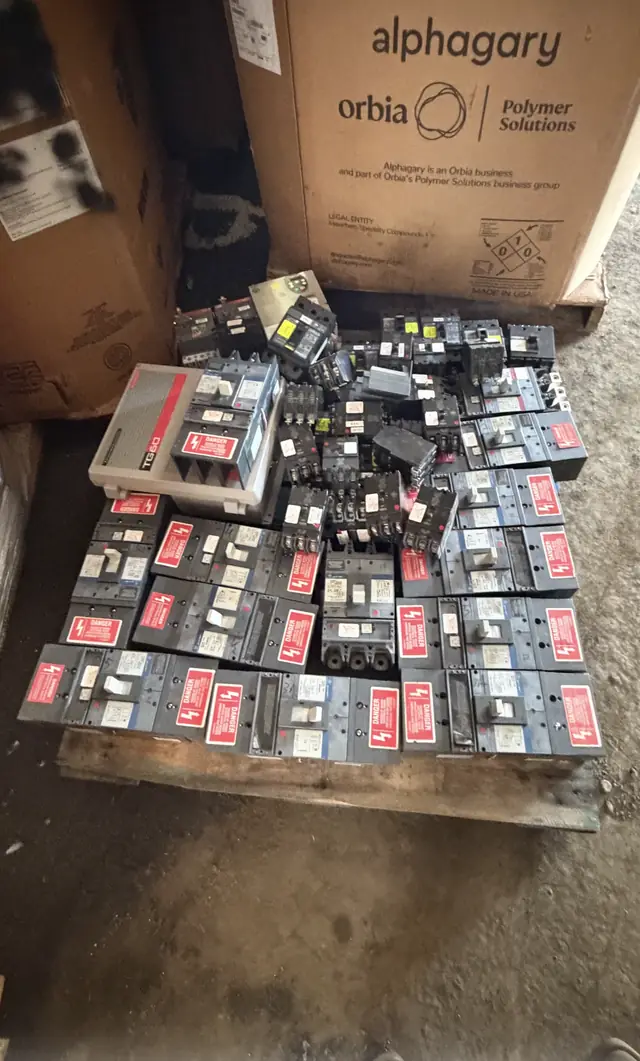
This guide covers only the TEST-button check performed from the panel front with the deadfront installed. Do not remove covers, perform internal or energized fault tests, or provide installation guidance. For suspected faults, damage, or any unsafe condition, stop and contact a qualified electrician and follow the breaker manufacturer’s instructions and the authority having jurisdiction.
Who this guide is for and what we buy
This page is written for people who need a safe, repeatable way to confirm whether an AFCI (arc-fault circuit interrupter) breaker responds to its built-in TEST button. We review qualifying used, surplus, and obsolete circuit breakers for purchase. If you plan to submit equipment for review, perform only the normal TEST-button check consistent with the breaker label or the manufacturer’s instructions before photographing and documenting the item.
This guidance is not an inspection report, purchase order, or guarantee of compatibility or safety. A website submission is not an appraisal, offer, acceptance, safety inspection, compatibility determination, purchase order, pickup commitment, or shipping authorization. If you are unsure about any results, stop and contact an appropriately qualified electrical professional and follow the breaker manufacturer’s instructions and the authority having jurisdiction.
- Intended for sellers and facility staff documenting AFCI condition
- Not a substitute for licensed electrical services
- Do only the TEST-button check described on the breaker label or in the manufacturer’s instructions
When to run the TEST-button check
Use the TEST-button check when you need a basic confirmation, per the device label, that the AFCI’s trip mechanism responds. Typical reasons include routine documentation before listing a breaker for sale, a visual condition check after removal from service, or a periodic functional check noted on the device. Do not attempt any fault injection, energized current injection, or in-panel wiring changes as part of this procedure.
If the breaker shows signs of thermal stress, burn marks, melted plastic, visible corrosion, or has been exposed to water or sustained outdoor weather, stop and do not press the TEST button. Also pause if you detect heat, odor, humming or buzzing noises, or other abnormal operation. These are indicators that the device or surrounding equipment needs a qualified electrician to evaluate before any testing.
- Appropriate for pre-sale functional confirmation only
- Not appropriate if breaker or panel shows damage or moisture
- Stop for heat, odor, noise, moisture, visible damage, or a failed test
Prepare the panel and environment
Confirm the panel door opens normally and that the deadfront is installed. The closed-panel approach keeps the breaker accessible from the front of the panel with the deadfront in place; do not remove covers or attempt internal access. Ensure your hands and the panel area are dry, and wear nonconductive footwear. Keep fingers clear of busbar openings and trim; operate only the external TEST button on the breaker face.
Gather a simple test log sheet, a camera for photos, and a way to mark or tag the breaker for identification. If anything about the environment feels unsafe—sparking, wet floor, chemical odor, or damaged enclosure—leave the area and arrange for an electrician to inspect.
- Panel door opens normally; deadfront stays installed
- Dry hands and nonconductive footwear advised
- Prepare camera and test log to record the result
Closed-panel TEST-button sequence (follow the device label)
Follow the exact instructions printed on the breaker and in the manual for your model. A typical label-directed TEST-button check done from the panel front follows this closed-panel sequence: (1) visually confirm the breaker handle is in the ON position; (2) using one finger, press and release the breaker’s TEST button; (3) observe whether the breaker handle moves to the TRIPPED or OFF position; and (4) if it trips, reset per the manufacturer’s restore procedure and confirm the handle returns to ON. Do not hold the TEST button down longer than directed and do not repeat tests unnecessarily.
If the breaker does not trip when the TEST button is pressed, do not perform further in-panel manipulation. Record the result in your test log and stop further checks. A non-tripping TEST button may indicate a malfunction that requires evaluation by a qualified electrician or a qualified service provider; do not assume absence of a trip proves the breaker is safe to continue using.
- Confirm handle in ON position before testing
- Press and release TEST button as instructed; observe for a trip
- If it trips, reset per manufacturer instructions and confirm ON
How to interpret results and keep a test log
Use a concise test log to record model identification, manufacturing markings, date, tester name, and the TEST-button outcome. Core identification fields are the manufacturer name on the breaker face, part or catalog number, voltage and amperage markings, date code if present, and visible condition notes such as plastic discoloration or terminal corrosion. Include clear photos of the breaker label and the panel deadfront in place to support a later purchase review.
Record the outcome as Pass (tripped then reset), Fail (did not trip), Abnormal (humming, odor, heat, or partial movement), or Not Tested (conditions unsafe). Note the number of attempts and any observations such as a slow trip or handle sticking. Keep the log with your sale documentation; we review qualifying items for purchase when submitted with clear photos and a truthful condition report.
- Fields: manufacturer, part number, voltage/amperage, date code
- Outcome options: Pass, Fail, Abnormal, Not Tested
- Attach photos of breaker label and panel deadfront
Safety limits and appropriate next actions
Do not use the TEST-button check to assess trip thresholds, endurance, or installation compatibility. This one-button check is a functional confirmation only and does not replace factory testing or formal laboratory evaluation. If the TEST button indicates a problem or if you observe heat, smell, noise, arcing, moisture intrusion, or visible damage, stop all testing and secure the device from further use until a licensed electrician examines it.
For non-tripping or abnormal results, document the condition and photograph affected features. Do not attempt internal repairs, energized traces, or substitute parts. If you intend to send the breaker for purchase review, include the test log, identification photos, and the specific notes about the abnormality. Qualifying submissions are evaluated after receipt; submitting an item does not imply an offer or acceptance.
- TEST-button check ≠ lab or endurance testing
- Stop for heat, odor, noise, moisture, visible damage, or a failed test
- Do not perform internal repairs or energized fault tests
Preparing a breaker for submission and the next steps
If your AFCI breaker responds as expected to the TEST-button check and you want to submit it for purchase review, assemble the test log, clear photos (breaker label, date code, panel deadfront), and an honest condition description. Use lot organization if you have multiple items—group like models and note quantity and any differences. Keep each breaker labeled so reviewers can match photos to the test log.
Remember that a submission is not a purchase commitment. We review qualifying items for purchase and may request additional information. Before shipping or arranging pickup, wait for explicit instructions from the buyer or reviewer. If you have any doubt about safety at any stage, stop and consult a licensed electrician familiar with the model shown in your pictures.
- Group like models and attach a test log to each lot
- Label parts clearly to match photos and documentation
- Wait for buyer instructions; submission is not a purchase order