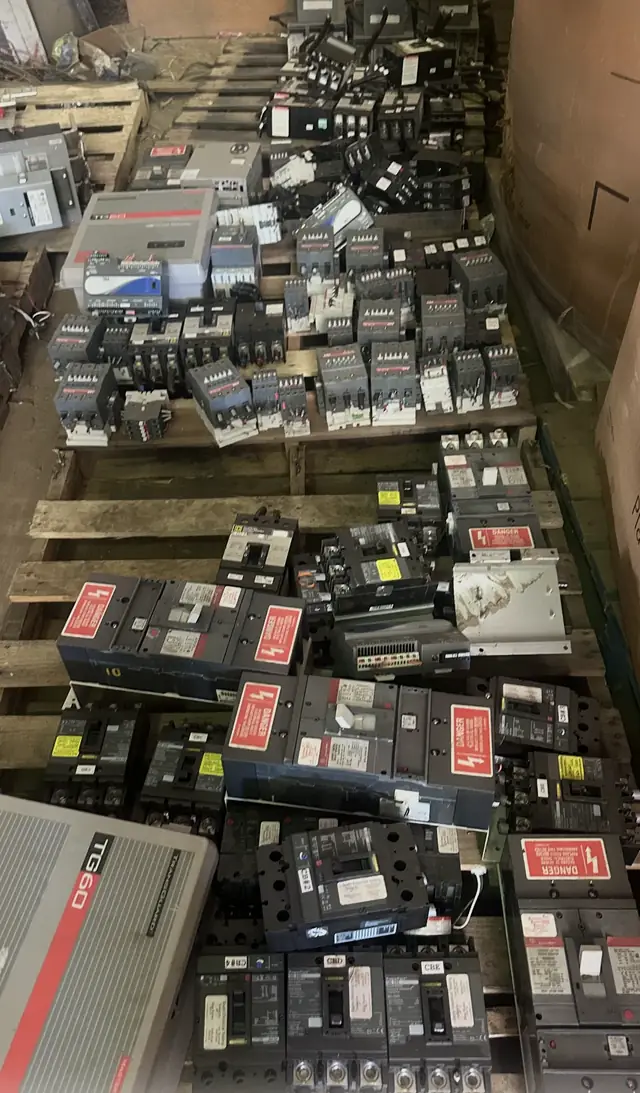
Capture identity before marketing language
Use columns for manufacturer, product family, exact catalog or type number, revision, serial or date code when appropriate, quantity, seller-declared condition, poles, amperage or trip, voltage, interrupting rating, frame, trip unit, rating plug, mounting, terminals, accessories, packaging, location, and photo filename.
Do not combine unlike items
Group items only when the exact identity, revision, condition, included components, and location match. A line that says “100 assorted breakers” forces the reviewer to start over. If a value is unknown, use “unknown” rather than copying a nearby label.
Use one section row plus linked component rows
For panelboards, switchboards, switchgear, motor control centers, or transformer projects, create an assembly row containing the nameplate, section, ratings, dimensions, weight, status, and location. Then create separate rows for major breakers, cradles, relays, meters, buckets, drives, and accessories.
Name images so another person can match them
Use a simple convention such as ITEM-001-overall, ITEM-001-label, and ITEM-001-condition-1. Keep names, addresses, employee records, access codes, customer documents, and other private information out of the image and filename.
Review the list against the physical lot
After data entry, choose a sample from each model group and compare the spreadsheet with the item and photographs. Check suffixes, poles, trip values, quantities, condition groups, accessories, and locations. Confirm that photo filenames point to the right row and that no filter or hidden spreadsheet row accidentally removes equipment from the exported copy.
For large counts, explain whether quantities are exact, carton counts, pallet estimates, or subject to final count. Precision should match the method used.
Export a stable copy for the review record
Keep the editable workbook, then export a stable PDF or CSV copy when requested so both parties can refer to the same version. Put a date and version in the filename. If the lot changes, issue a new version and identify the changed rows rather than overwriting the previous record without explanation.
Do not include passwords, financial account details, government identifiers, employee records, or customer-confidential documents in the workbook.
Document obsolescence, successors, and acceptable substitutes
When a breaker model is no longer supported, state that status explicitly instead of leaving reviewers to infer it from age or appearance. Add a dedicated column such as “obsolescence status” with entries like current, superseded, end-of-production, or unknown, plus any available date code or last catalog revision. Where a manufacturer lists a direct successor or an approved replacement, record the successor part number and cite the source (datasheet filename, page, or public bulletin). If a part has a potential cross-reference from a different maker, list it as an alternate and note the specific differences in frame, mounting, trip characteristics, or terminal style so a technical reviewer can quickly judge relevance.
For assemblies that rely on now-obsolete breakers or modules, include the assembly nameplate photo and any factory or shop modification plates so reviewers understand whether replacement options exist. If aftermarket adapters, rework items, or non‑OEM relays are present, describe them in an modifications column and attach supporting document filenames when possible. These entries do not certify interchangeability or safety; they simply provide the reviewer with context. Qualifying items may be reviewed when obsolescence and substitute information is documented sufficiently for a technical follow-up.
- Fields to add: obsolescence status, successor/alternate PN, date code
- Cite source: datasheet filename or bulletin page
- List physical differences for alternates instead of calling them 'compatible'
Capture provenance, repair history, and traceability details
Documenting provenance reduces uncertainty for reviewers evaluating used or rebuilt electrical equipment. Create a provenance column capturing original purchase date or installation year when known, any factory remanufacture tags, third‑party rebuild certificates, and maintenance-record references that affect traceability. Where supporting paperwork exists, attach filenames for invoices, work orders, or calibration certificates; if records are missing, mark them unavailable rather than implying a history. For items removed from larger installations, include the original equipment identifier — for example the switchboard serial or project job number — so the lot can be associated with a single project record.
When a breaker or assembly shows evidence of prior repair, note what was replaced and whether seller-declared OEM parts were used according to available documentation or tags. For protection relays, meters, and trip units, record the last-known calibration date and who performed it if that detail exists. Maintaining a traceability trail does not confirm current condition or safety, but it provides reviewers with the context that often changes technical interest; qualifying items may be reviewed conditionally based on completeness of provenance records.
- Provenance fields: installation year, repair tags, supporting document filenames
- If unknown, explicitly mark records as unavailable
- Include project or switchboard serial when applicable
Score and flag lots to prioritize faster technical review
Not every lot requires the same level of attention. Add a simple priority score so reviewers can focus on high-impact groups first. Typical factors that increase priority include well-known OEMs with market pull, higher interrupting ratings, uncommon frame sizes, large single-model quantities, intact factory packaging, and availability of original manuals. Use weighted columns for those factors — for example, give interrupting rating and quantity greater weight — and compute a summed priority value. Visually flag high-priority rows so a reviewer scanning an exported file can immediately identify candidate lots for rapid evaluation or follow-up.
Time sensitivity and handling requirements are additional flags that influence turnaround. Mark items needed for immediate projects, inventory exposed to weather, or material incurring storage charges as expedited. Note special handling such as oversized assemblies, crated transformers, or components that require climate-controlled storage in a handling-notes field. Also note whether packaging permits immediate shipping and whether site access is restricted so reviewers can estimate lead time. Qualifying items may be reviewed on a priority basis when documentation and high-impact indicators support a faster appraisal.
- Priority factors: OEM brand, interrupting rating, quantity, packaging intact
- Handling notes: oversized, crated, climate needs, access restrictions
- Indicate if representative testing access exists